ZGR Global Digital & Online Services
Counter Service
CNY Channel Remittance Limits and Conditions
Bank-to-bank
| Limitation | This Remittance is capped at RMB 50,000 per transaction and service fee SGD 18 per transaction, maximum 5 transactions per month and capped at RMB 500,000 per beneficiary. |
| Supported Banks | All Chinese banks except rural credit cooperative debit card & credit card. * We will require the beneficiary to provide his/her photocopy of China IC as well as bank registered phone number. Your data is safe with us. Please read our Privacy Policy for more details. |
Corporate Safe Channel
| Introduction | To Corporate Account (B2B) OR To Individual Account (B2C) 1. Corporate customer could remit to China local company account. 2. Corporate customer could remit to China local company Director/Shareholder personal account |
| Limitation | Corporate Remittance safe channel is capped at RMB 1 million (within the Invoice amount) and service fee SGD 18 per transaction. |
| Supported Banks | All Chinese banks except rural credit cooperative debit card & credit card. |
| Required Documents | 1. Business License of Company Receiver 2. Performa Invoice/Purchase Order 3. Waybill/Logistics Certificate 4. China Citizen Identification Number (中国身份证号, B2C only) |
Alipay
| Limitation | Alipay Remittance is capped at RMB 50,000 per transaction and service fee SGD 18 per transaction. Currently, Quick Collect (闪速收款) is only open to: – users with Chinese Mainland resident identity cards; – users from Hong Kong, Macao and Taiwan with valid documentation, completed real-name authentication and possess a Chinese Mainland bank account. This service is only applicable to individual remit, please proceed to our counter to do the remit. |
May I get the better exchange rate to remit if the exchange rate becomes higher after I have done my ibanking transaction?
The best rate will be given to you on the day the transaction is done. The rate cannot be changed after we have received your transaction statement. Thank you for your understanding.
If the Beneficiary is currently living in Singapore, how can they check that the funds has been credited to the account overseas?
We recommend the Beneficiary to check via the respective banks’ online banking services.
How long does it take for the Beneficiary to receive the funds?
The Beneficiary should receive the funds within 1 working day.
However, the speed of the remittance might vary due to public holidays in Singapore and/or Beneficiaries’ countries which might lead to a slight delay in the receipt of funds by the Beneficiary.
If the Beneficiary’s Name or Account Number provided to us is invalid, will the funds be lost?
No. The funds remitted will be rejected by the Beneficiary’s bank and we will retain the funds until the correct information is provided by you. We will resend the funds to the Beneficiary free of charge.
Individual Online Remittance
How do I register for a ZGR Online account?
Before you register for a ZGR Online account:
ZGR Online Account eligibility requirements:
- At least 18 years old.
- Singapore citizen, Singapore permanent resident or Foreign Identification Number holder. You must have an NRIC/FIN card or Singpass account.
- You can only have one ZGR Online Account.
To register for a ZGR Online account:
Please click here and complete your application.
How to upload required files via ZGR app / online service?
Once you received the notification, you may log in your ZGR app or online service to submit the required file. At Home page, click on ‘Upload now’.
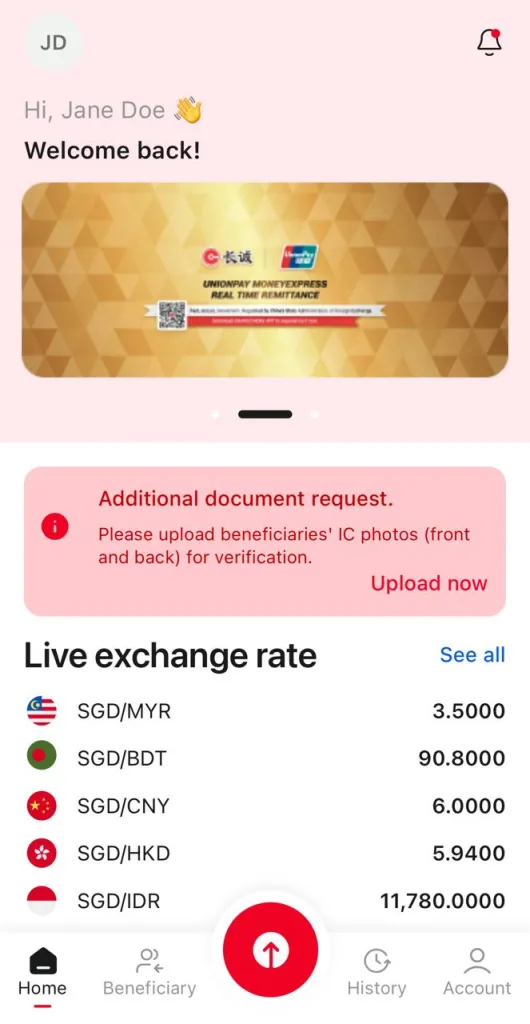
Then follow the requirement to upload required files. Maximum 3 files, end with jpg, png or pdf only.
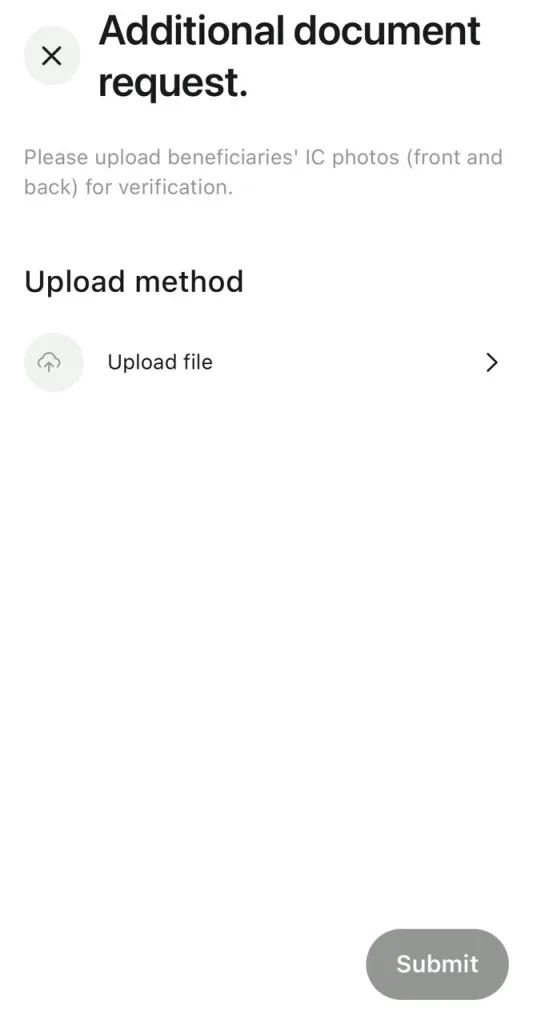
Once you submitted, we may take 1 to 2 business day to verify and process your transaction. You will received notice for the transaction updates.
How to turn off Voucher Notification
Please login your Web Remit (https://remit.zgr.sg) or Changcheng app.
Click on My Account > View My Voucher, then untick Voucher SMS Notification.
For Changcheng App, go to My Info > Settings, then select No for View My Voucher.
If you are not our client, please contact our customer service center for assistant.
I don’t want to continue a transaction anymore. How do I apply for a refund?
If you want to stop a processing transaction, please first contact us via our customer service center. We will arrange a refund for you after confirming your transaction and payment.
Refunds can be made in Web Remit > History. By clicking on the transaction that requires a refund and then clicking the Apply for Refund button.
After complete the refund information, the system will automatically arrange a refund to you.
*Please note:
- If you fill in the wrong transferred amount, refund to the account time may be affected or the refund cannot be completed.
- Service fee is not refundable.
- Be sure to check your refund account information is correct, if the account number is wrong may cause your money to transfer to another person’s account.
- The refund feature is only available after we have confirmed your payment, so please be patient before then. If you have any questions, please contact our Customer Service Center.
How to update when the beneficiary’s information is wrong?
If you receive a notification from us that the beneficiary’s information is incorrect and you are unable to complete the transaction, you can go to Web Remit > History, then click on the transactions which need to be updated and click on “Edit Beneficiary”.
If there is no correct beneficiary information in the beneficiary list, you need to update the information at Beneficiary first, then follow the steps above to enter the “Edit Beneficiary” interface and select the latest beneficiary. Alternatively, you can choose to remit to other beneficiary.
Once you have made your selection, click Confirm. The system will then ask you to verify that the information is correct and enter the SMS OTP.
Click OK when done and the system will process it again according to your latest information.
Troubleshoot
Cannot submit, an “unexpected form submission” detected
- Your previous submission may not be completed, or aborted.
Please close your browser completely and try again. - If there is still a problem
Please clear your browser’s cookies and cache and try again. - If the problem continues
Please change your browser and try again. For the supported browsers, please see the top of this page. - If the problem cannot be solved
You can try using other equipment or call our customer service center.
Cannot login
- In process of approval
Please wait for our relevant department to review your information and SMS notice you can use it before logging in. - Wrong password
Check that the case lock on your keyboard is turned on and the keys are normal. - Account Locked
If you enter the wrong password multiple times, the account will be locked to the next day 00:00. We recommend that customer change their password when you wait for your account to unlock and log in with your new password next day.
Alternatively, customer may contact our customer service center for unlocking account. - Clear cache & cookies
When you use a browser, like Chrome, it saves some information from websites in its cache and cookies. Clearing them fixes certain problems, like loading or formatting issues on sites.
You may visit Google Account Help to learn more.
Cannot receive Email
- Check junk folder
Some mailboxes may mistakenly archive the verification or remittance message as spam, try to find it in junk folder, and add our mailing address or domain name to the whitelist. - Check mailbox filtering rules
If your mailbox is set up to receive message validation rules that may prevent your mail from getting into your inbox, check to see if it is blocked, and contact your email service provider if necessary.
Cannot receive SMS
You should receive the Web Remit OTP within few seconds to your registered mobile phone number.
As the OTP is delivered using SMS, it is dependent on the mobile operator’s network and traffic condition. Therefore, there may be some delays during peak periods or on certain days; public holidays like Christmas.
- Check your blocklist
Some devices may block network text messages, please check that if your blocked list includes messages from us. - Check your SIM card bundle
Some SIM cards may not include SMS packages (such as Mobile Broadband cards). Be sure to use a SIM card that can send and receive SMSes normally. - Check the status of your ISP
Internet Service Providers (ISPs) may temporarily disrupt networks, calls, or newsletters for some reason. In such cases, please wait until the network operator resumes normal. - Try again
It is sometimes impossible to send or receive messages because of congestion in the carrier messages queue or busy network. If you do not receive the messages, click Resend OTP. - Restart your phone
Restart to reconnect to your ISP network and try again.
Cannot show login page
- Check your network
Try to see if you can successfully access other sites. If you cannot access it successfully, check if your Local Area Network (LAN) and Wireless Local Area Network (WLAN) are connected properly, and contact your network service provider (ISP) if necessary. - View site maintenance schedule
To improve the interface, security, and user experience, we irregularly update the website. During the update period, you cannot use some or all of the website features. You can get maintenance information on our website, WeChat and customer service center. - Check settings and status of hardware and software on your device
Some security software, firewalls, virtual private networks (VPNs), hardware firewalls, switches, and cable status can also affect your network access, loading, and transport. If necessary, please add our URLs to whitelist and check your network device status regularly. Professional questions can contact the equipment manufacturer or distributor. - Check your browser
Periodically clean up the browser cache and check to see if Javascript is enabled for your browser. For more information about enabling JavaScript, refer to the external site (🔗 aboutjavascript.com).
Get Support
Share with us some details and we’ll provide the best solution. Connect by phone, chat, email, and more.

